Every AI Finder
Back to all tools
AI Tools / Transync AI
Translation & LocalizationLast updated: October 30, 2026
T

Transync AI

Real-time speech translation app for Windows, macOS, iOS, Android and the web from Transync AI Inc.: it listens to a meeting or conversation, detects the language, shows bilingual subtitles in 60 languages including Korean and can read the translation aloud, with meeting notes, speaker separation and a presentation mode. Works alongside Zoom, Teams, Meet and WhatsApp with no bot. Korean interface. 40 free minutes on sign-up, then Personal Premium at $8.99 a month for 10 hours.

Official info checkedThe official site and key public product facts were checked. This is not a full hands-on test.How verification works

Field-level verification freshness

Pricing, free plans, Korean quality, terms, and service status are tracked with separate dates and sources.

Pricing checked

Recently checked

2026-10-29

Source

Free plan checked

Recently checked

2026-10-29

Source

Korean quality checked

Needs verification

Date or source missing

Commercial terms checked

Recently checked

2026-10-29

Source

Service status checked

Recently checked

2026-10-29

Source

Transync AI product images

Provided by the maker. Every AI Finder did not capture or test these screens, and they may differ from the current version.

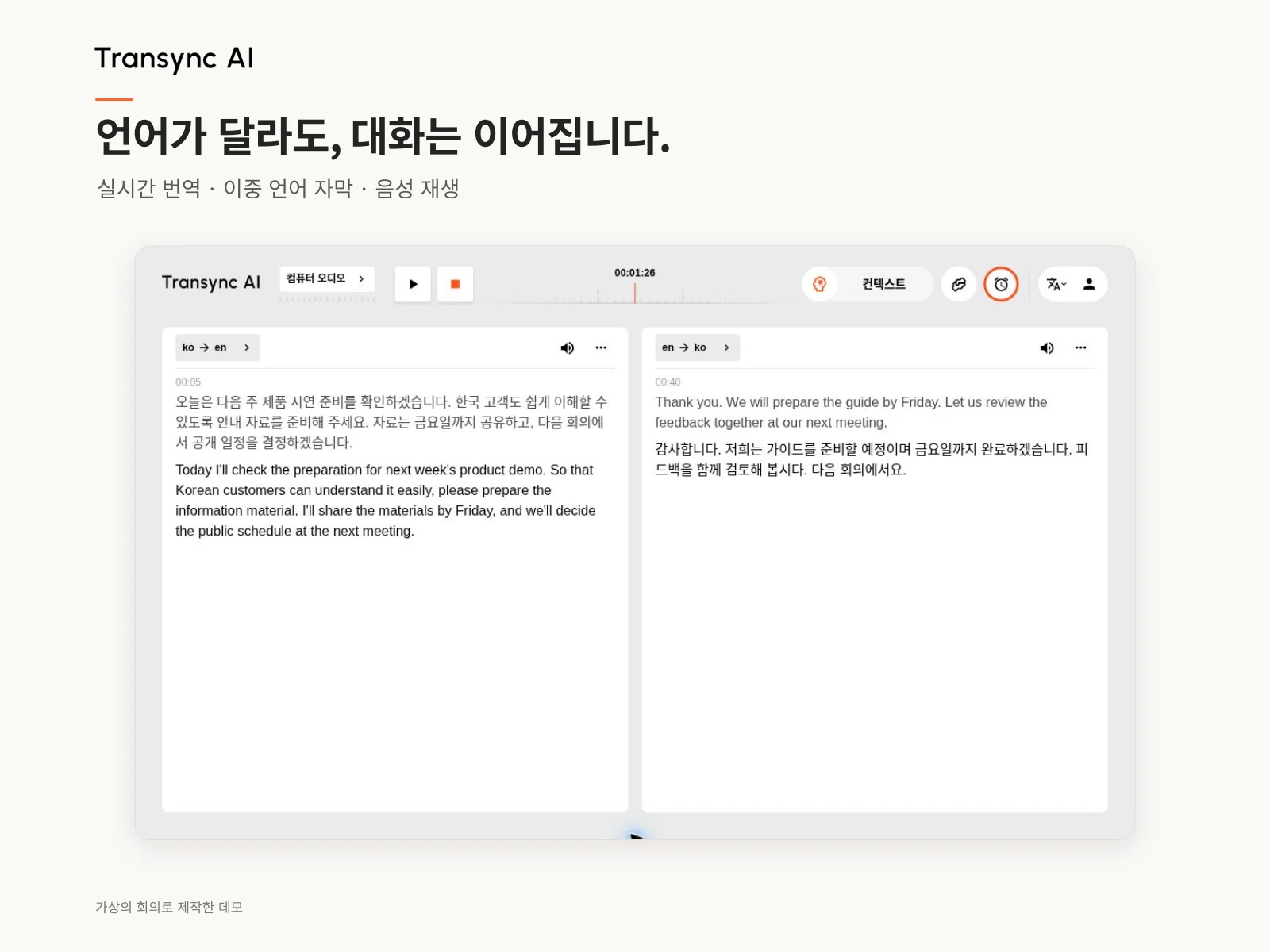
Transync AI: Real-time translation

Korean-to-English and English-to-Korean panels show the original and the translation side by side in the Korean interface. The maker built this demo from a fictional meeting.

Provided by the maker 2026-10-30View full size

Beginner friendly

Supported

Korean support

Supported

Supports Korean output. Localization depth can vary by task type.

Mobile support

Supported

Offers a mobile app or mobile-friendly web experience for working on the go.

Commercial use

Supported

A business tool: transcripts and notes are yours to use. The terms give Transync AI Inc. the right to show an Enterprise customer's name and logo in its marketing, and the privacy policy says voice and text data are not used for AI training. Check your own meeting-recording consent rules before translating others.

Sources & verification

Use these primary sources to confirm current pricing, terms, and product details.

Information date: October 30, 2026Official info checkedHow verification works
Quick decision guide
Best for
  • Following a Zoom meeting with overseas clients in Korean subtitles while they speak English or Chinese
  • Live subtitles for a conference talk that the audience opens with a QR code
  • Bilingual meeting notes with action items after a supplier call
  • Beginners who want to start without a steep learning curve
Not ideal for
  • Users whose main job is outside Translation & Localization — check a tool matched to your category first
Plans & pricing notes

Free plan

Sign-up gives 40 minutes of real-time translation once, with 60 languages, voice playback, keywords and context, and meeting minutes, on all devices. It does not renew.

Paid plans

Personal Premium $8.99 a month for 10 hours, resetting monthly, with in-app purchase. Time cards for members: 10 hours $7.99, 30 hours $22.99, 100 hours $69.99. Enterprise $24.99 per seat a month for 40 hours, then $0.70 an hour from a prepaid balance, with volume discounts from 2% to 10%. Multilingual translation counts 2x from three languages up to 9x at ten.

Review summary

What Transync AI is best for

Transync AI sits beside whatever call or meeting you are in and translates what it hears. It captures your speech and the other side's through the system audio, detects each speaker's language without a switch, and shows split-screen subtitles in the original and the translation; a voice-playback option reads the translation aloud with natural voices, and a virtual microphone can send that translated voice into the call. It supports 60 languages, including Korean, Chinese, English, Japanese, Cantonese, German, French, Russian, Italian and Spanish, and runs on Mac, Windows, iOS, Android and the web with data synced across devices. Beyond translation it produces bilingual transcripts, AI meeting summaries with action items and decisions, separates speakers, accepts keywords and context to improve accuracy, offers a picture-in-picture floating subtitle window, and has a presentation mode that lets an audience follow live subtitles through a QR code or link. The site says it works with Zoom, Microsoft Teams, Google Meet and WhatsApp calls with no bot or extension. Pricing: a free sign-up gives 40 minutes of real-time translation once; Personal Premium is $8.99 a month for 10 hours, with time cards of 10 hours for $7.99, 30 for $22.99 and 100 for $69.99 that can only be used during a membership; Enterprise is $24.99 per seat a month for 40 hours, then $0.70 an hour. Multilingual sessions count more: three languages cost twice the time and ten languages nine times. The terms name Transync AI Inc., registered at a Sheridan, Wyoming address, and the privacy policy says data is not used for AI training. The homepage says the company is GDPR, ISO 27001 and HIPAA compliant and pursuing SOC 2 Type II. Its Trust Center lists ISO 27001 as compliant, HIPAA as HIPAA-ready and SOC 2 Type II as in progress, but its reports and policies are available on request only, so we have not seen a certificate. The site does not name the speech or translation models it runs, describing them as "end-to-end AI speech model technology". The maker's app screenshots show a model selector labelled Monsoon 2.5, which the site does not explain, and the Trust Center lists MiniMax, Soniox and an entry called Affordable Speech-To-Text API as AI subprocessors, alongside Google Cloud and Alibaba Cloud for infrastructure. The website is available in Korean.

Pros
  • Korean is both a translation language and a site language, and the maker is named in the terms
  • Works with Zoom, Teams, Meet and WhatsApp without a bot joining the call
  • Clear hourly pricing with time cards, and data not used for AI training
Cons
  • The free allowance is a one-time 40 minutes, not a recurring free tier
  • The speech and translation models are not named, and we could not check the GDPR, ISO 27001 and HIPAA claims because the Trust Center documents are available on request only
  • Multilingual sessions burn time fast: three languages count double and ten count nine times
Key Features

Real-time two-way translation with automatic language detection and split-screen subtitles in 60 languages including Korean

Spoken translation with natural voices, voice clone, and a virtual microphone for calls

Bilingual transcripts, AI meeting summaries, speaker separation, keywords and context

Presentation mode with QR-code audience access, floating subtitles, apps for Windows, macOS, iOS, Android and web

Best use cases

Following a Zoom meeting with overseas clients in Korean subtitles while they speak English or Chinese

Live subtitles for a conference talk that the audience opens with a QR code

Bilingual meeting notes with action items after a supplier call

Frequently asked questions

What is Transync AI best for?

Transync AI is worth considering for Translation & Localization workflows where you want faster drafts, automation, or clearer tool comparison.

Can I use Transync AI for free?

Its current pricing type is Freemium. Check the official site for exact free limits, paid plans, and usage restrictions.

What should I check before choosing Transync AI?

Compare pricing, language support, mobile availability, commercial-use terms, and output quality before committing.

Discuss Transync AI with the community

Ask questions and share hands-on experience, tips, and prompts.

View discussions

Alternatives in Translation & Localization

Compare nearby options before you commit.

View category
ShareXLinkedInFacebookThreads

Affiliate disclosure: we may earn a commission if you visit or purchase through links on this site. Tool details are summarized for decision support and should be verified on the official website before purchase.